
See which companies visit your website
See which companies visit your site, what they read and who to call. No cookies.

A visit can tell you more than a page count
A company may read about your services without sending an enquiry. Visitorscheck helps you see that interest and decide whether to follow up.
Put a company name to a visit
Recognise companies visiting from business networks. Home and mobile connections are deliberately skipped, so not every visitor will be identified.
See what caught their attention
Check the pages a company viewed, time on site and return visits before you get in touch.
Find a starting point for a call
Look for an owner or decision maker and available contact details. Each field shows its source, and some fields may be missing.

From a website visit to your next follow-up
Add Visitorscheck to your site, then use the dashboard to review company visits.
 1
Add it to your website
Use the WordPress plugin, Google Tag Manager or a small script. The setup wizard checks that the script is working.
 2
See recognised companies
Visitorscheck recognises companies by business IP. It can also use the domain of a work email entered in a form on your site, without sending the full address.
 3
Choose who to contact
Review visited pages and available contact details. Add a note to the company record when you follow up.
See the visits behind a company name
Use the overview to check activity, then open a company to see what it has been reading.
Today and this week at a glance
Start with the numbers in your dashboard to see recent website activity.

Find companies worth a closer look
Filter your company list and save segments to return to the same selection later.
Read the visit history before you call
See a visit timeline with pages viewed, time on site and traffic source. Keep your notes with the company record.

View visitors grouped by company
Review visits together under the company they belong to. Company recognition does not tell you which individual visited.

Example with fictional companies
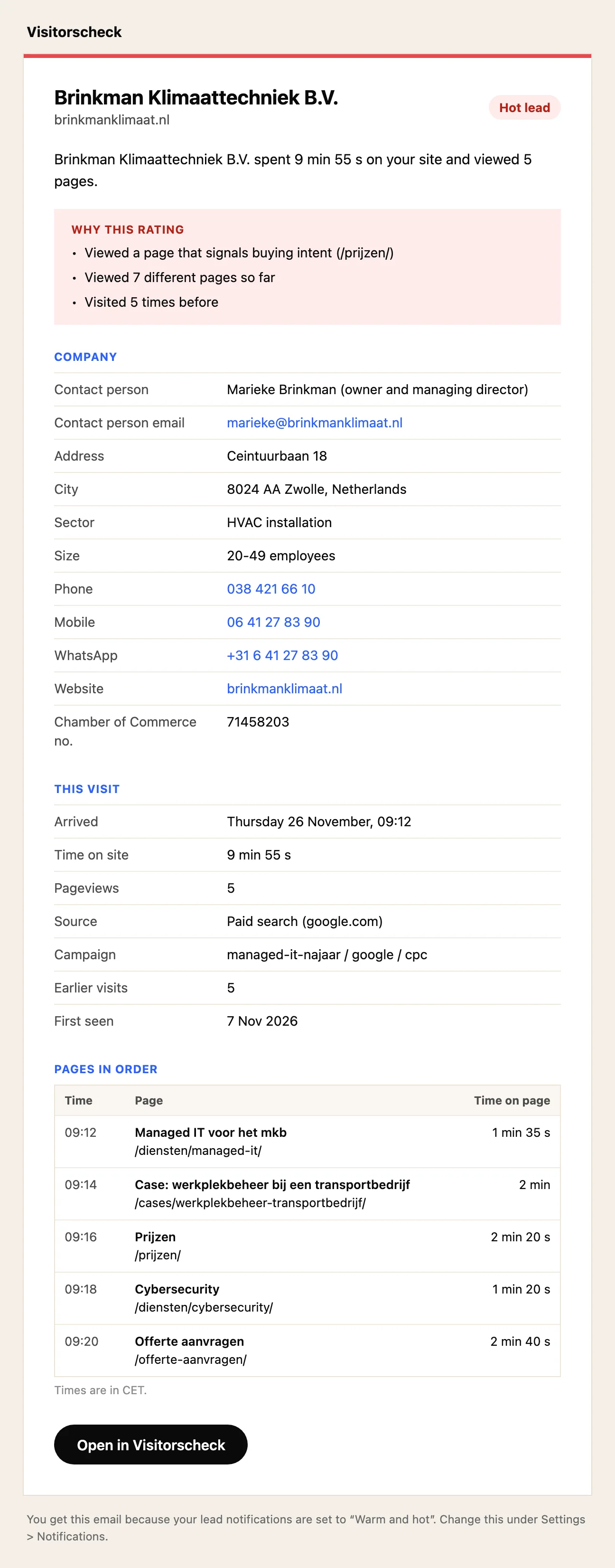
One email after every visit, with the full story
When an identified company views no new page for 10 minutes, its visit has ended. You then get one email about that visit: who the company is, who to call and what they looked at. Each user chooses which visits send an email.
- The company and contact person, with mobile, WhatsApp and email when known
- Every page in order, with time per page and total time on site
- The traffic source or campaign, and earlier visits by the company
- Your choice: every identified company, warm and hot, only hot, or off
Brinkman Klimaattechniek B.V.
brinkmanklimaat.nl
- Owner or decision maker
- Marieke Brinkman
- Mobile number
- 06 41 27 83 90
- Business email
- marieke@brinkmanklimaat.nl
- Chamber of Commerce no. (KvK)
- 71458203
- Sector
- Installatietechniek
- Address
- Ceintuurbaan 18, Zwolle
Example with fictional companies
Contact details with a source you can check
Open a company record to find available contact details and business information, including its employee range. Not every company has every field.
- Owner or decision maker
- Mobile number
- Business email
- Chamber of Commerce no. (KvK)
- Sector
- Address
Each field has a source label: the company website, the Dutch Chamber of Commerce register (KvK) or LeadOcean, a B2B data provider.
Use company visits in your existing workflow
Export to CSV on every plan. Growth and Business also connect to HubSpot and Slack, with webhooks and a REST API for your own connections.
 WordPress pluginLive
 Shopify appComing soon
 Google Tag ManagerLive
- Script tagLive
 HubSpotLive
 SlackLive
- WebhooksLive
- REST APILive
Hot leads straight to your phone
The app for iPhone and Android is on its way. Once the App Store and Google Play approve it, you get a push notification when a visit ends, at the same level you chose for your lead emails.
- Push notification as soon as a visit ends
- For iPhone and Android
Company recognition without cookies
The Visitorscheck script uses no cookies or fingerprinting. You do not need a cookie banner for this script itself.

Business networks only
IP recognition uses business networks. Home and mobile connections are deliberately skipped.
Only the email domain is sent
When a visitor enters a work email in a form on your site, the script sends only its domain to recognise the company, never the full address.
Hosted in the EU
Data is hosted in the EU. A daily deletion process removes data older than the history period included in your plan.
Visitors can opt out
Visitors can opt out using the URL parameter ?vc_optout=1.
Plans from €29 per month
Choose Starter, Growth or Business. Pay yearly for 2 months free. All prices exclude VAT. Try Starter free for 14 days without a credit card.
See which companies visit your site.
€29per month
100 unique companies identified per month
Follow up leads from your CRM and Slack.
€49per month
500 unique companies identified per month
For high-traffic sites and agencies.
€69per month
Unlimited companies, subject to fair use
Before you get started
Will Visitorscheck recognise every visitor?
No. IP recognition works with business networks and deliberately skips home and mobile connections. Visitorscheck can also recognise a company from the domain of a work email entered in a form on your site.
Will I know who visited?
Visitorscheck recognises companies. A listed owner or decision maker is a possible contact at that company, not confirmation of the individual who visited.
Does the script need a cookie banner?
The Visitorscheck script uses no cookies or fingerprinting, so it does not need a cookie banner itself. This applies to the Visitorscheck script only.
How do I install it?
Use the WordPress plugin, the one-click Google Tag Manager installation or a script tag. The setup wizard checks that the script works. The Shopify app is coming soon.
Where do the contact details come from?
Public company websites, the Dutch Chamber of Commerce register (KvK) and LeadOcean. Each field shows its source. Not every company has every field.
What does the free trial include?
You can try Starter free for 14 days without a credit card. Starter includes 100 unique companies per month, 30 days of history, contact data and lead emails.

See which companies are taking an interest
Try Starter free for 14 days. Check company visits and available contact details before deciding who to call. No credit card needed.
14 days free on Starter. No credit card needed.