Give your sales follow-up a useful starting point
See which companies visit, what they read and how to contact them where details are available. Use that context to decide your next step.

Recognise companies visiting your website
Visitorscheck matches business IP addresses to companies. It deliberately skips home and mobile connections, so it cannot identify every visitor.
- Recognise companies from visits on business networks.
- Use work email domains entered in website forms, without sending the full email address.
- Review visited pages, time on site and traffic source.
- See return visits in the company timeline.

Brinkman Klimaattechniek B.V.
brinkmanklimaat.nl
- Owner or decision maker
- Marieke Brinkman
- Mobile number
- 06 41 27 83 90
- Business email
- marieke@brinkmanklimaat.nl
- Chamber of Commerce no. (KvK)
- 71458203
- Sector
- Installatietechniek
- Address
- Ceintuurbaan 18, Zwolle
Example with fictional companies
Find available business contact details
Company records bring together contact and business information from public company websites, the KvK register and LeadOcean. Some fields may be missing.
- Look for an owner or decision maker.
- Find a mobile number or business email where available.
- Check the Chamber of Commerce no. (KvK), sector and address.
- See the employee range where available.
- Check the source label on each field.
A lead email after every visit
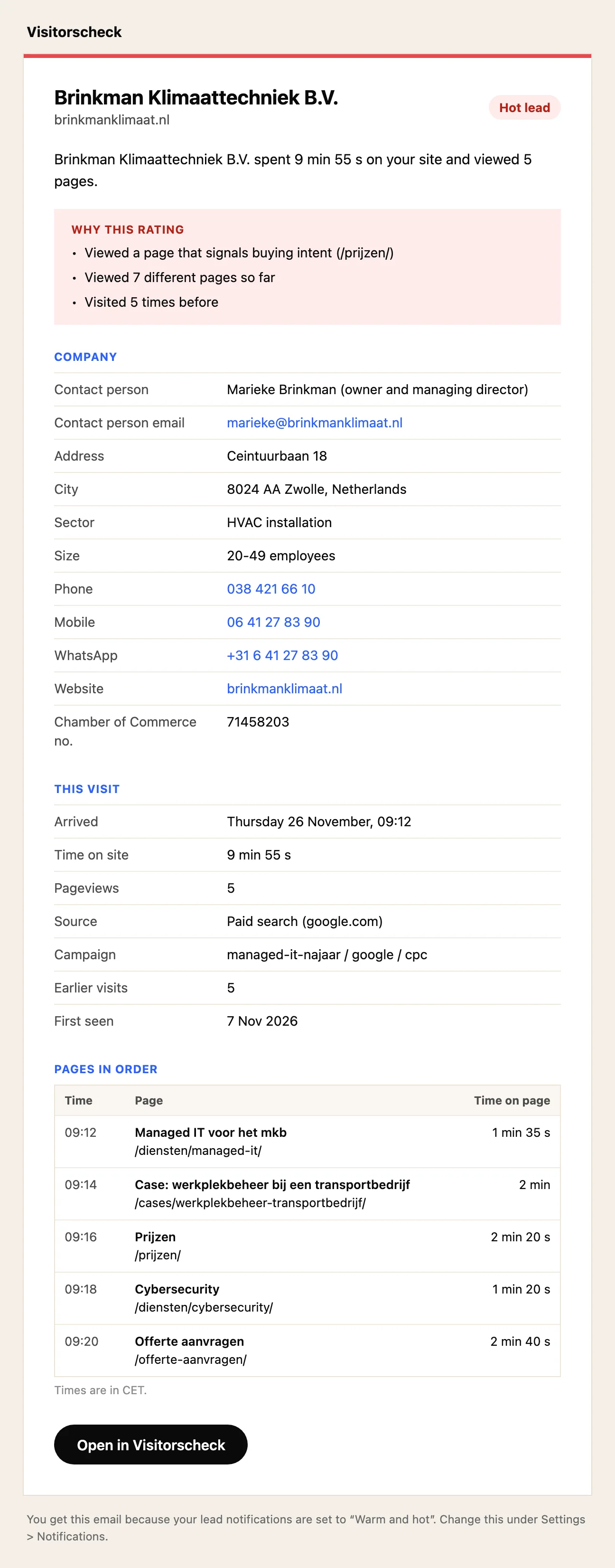
When an identified company views no new page for 10 minutes, its visit has ended and you get one email. Hot means buying intent and at least 3 different pages. A visit that only saw the homepage is never hot.
- One email per visit, with every page in order, time per page and total time.
- The contact person with mobile, WhatsApp and email, when known.
- Set per user: every identified company, warm and hot, only hot, or off.
- On Growth and Business: set your own lead scoring and get Slack alerts, with one level for the whole workspace.


Keep company follow-up in one place
Invite colleagues to work with the company information in Visitorscheck. Keep notes alongside the visits that prompted your follow-up.
- Invite colleagues to your team.
- Add notes to each company record.
- Filter the company list and save segments.
- Export company data to CSV.
Install it the way that suits your website
The setup wizard detects WordPress, Shopify or Google Tag Manager and checks that your script is working. The Shopify app is coming soon.
- Install the live WordPress plugin.
- Use the live one-click Google Tag Manager installation.
- Add the small script directly to your website.
- Check the installation in the setup wizard.


Try it with visits to your own website
Start a free 14-day Starter trial and see recognised companies in your dashboard. No credit card needed.
14 days free on Starter. No credit card needed.